The annotation ExampleObject is used to illustrate a particular Content for Request and Response. The documentation states that we can use a URL externalValue for referencing an external JSON file.
The json files were located under src\main\resources\META-INF\resources
    @GET
    @Path("/user")
    @Produces(MediaType.TEXT_PLAIN)
    @APIResponses(
            value = {
                    @APIResponse(responseCode = "200", content =  @Content(
                            mediaType = "*/*",
                            examples = {
                                    @ExampleObject(name = "User",
                                            summary = "User Example Summary",
                                            externalValue = "http://localhost:8080/user.json")
                            }

                    ))
            }
    )
However that still does not work, and Swagger UI will be empty:
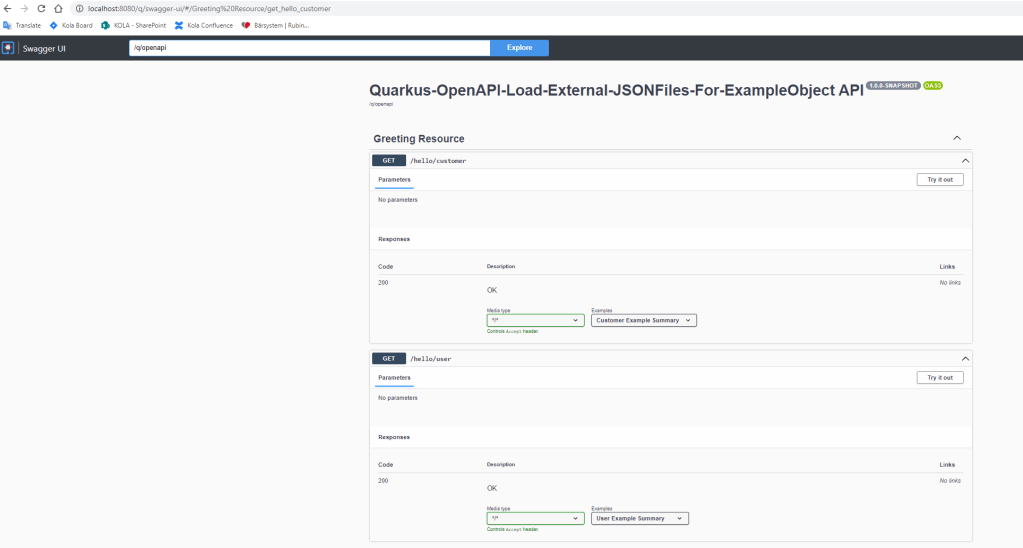
To get around this, we had to implement a custom OASFilter which allows us to modify the openAPI tree, and add the external JSON files.
package org.acme;

import com.fasterxml.jackson.databind.ObjectMapper;
import com.fasterxml.jackson.databind.node.ObjectNode;
import org.eclipse.microprofile.openapi.OASFactory;
import org.eclipse.microprofile.openapi.OASFilter;
import org.eclipse.microprofile.openapi.models.Components;
import org.eclipse.microprofile.openapi.models.OpenAPI;

import java.io.IOException;
import java.nio.charset.StandardCharsets;
import java.util.LinkedHashMap;
import java.util.Map;

import org.eclipse.microprofile.openapi.models.examples.Example;

import io.quarkus.logging.Log;

public class CustomOASFilter implements OASFilter {

    ObjectMapper objectMapper = new ObjectMapper();

    @Override
    public void filterOpenAPI(OpenAPI openAPI) {

        //openApi.getComponents() will result in NULL as we don't have any openapi.yaml file.
        Components defaultComponents = OASFactory.createComponents();
        if (openAPI.getComponents() == null) {
            openAPI.setComponents(defaultComponents);
        }

        generateExamples().forEach(openAPI.getComponents()::addExample);
    }

    Map<String, Example> generateExamples() {

        Map<String, Example> examples = new LinkedHashMap<>();

        try {

            ClassLoader loader = Thread.currentThread().getContextClassLoader();

            String userJSON = new String(loader.getResourceAsStream("user.json").readAllBytes(), StandardCharsets.UTF_8);
            String customerJson = new String(loader.getResourceAsStream("customer.json").readAllBytes(), StandardCharsets.UTF_8);

            Example userExample = OASFactory.createExample()
                                            .description("User JSON Example Description")
                                            .value(objectMapper.readValue(userJSON, ObjectNode.class));

            Example customerExample = OASFactory.createExample()
                                                .description("Customer JSON Example Description")
                                                .value(objectMapper.readValue(customerJson, ObjectNode.class));

            examples.put("userExample", userExample);
            examples.put("customerExample", customerExample);

        } catch (IOException ioException) {
            Log.error(ioException);
        }
        return examples;
    }

}
Update application.properties to use this custom filter:
mp.openapi.filter=org.acme.CustomOASFilter
Update the Controller @ExampleObject annotation to reference the previously created examples.
package org.acme;

import org.eclipse.microprofile.openapi.annotations.media.Content;
import org.eclipse.microprofile.openapi.annotations.media.ExampleObject;
import org.eclipse.microprofile.openapi.annotations.responses.APIResponse;
import org.eclipse.microprofile.openapi.annotations.responses.APIResponses;

import javax.ws.rs.GET;
import javax.ws.rs.Path;
import javax.ws.rs.Produces;
import javax.ws.rs.core.MediaType;

@Path("/hello")
public class GreetingResource {

    @GET
    @Path("/user")
    @Produces(MediaType.TEXT_PLAIN)
    @APIResponses(
            value = {
                    @APIResponse(responseCode = "200", content =  @Content(
                            mediaType = "*/*",
                            examples = {
                                    @ExampleObject(name = "User",
                                            summary = "User Example Summary",
                                            ref = "userExample")
                            }

                    ))
            }
    )
    public String helloUser() {
        return "Hello User";
    }


    @GET
    @Path("/customer")
    @Produces(MediaType.TEXT_PLAIN)
    @APIResponses(
            value = {
                    @APIResponse(responseCode = "200", content =  @Content(
                            mediaType = "*/*",
                            examples = {
                                    @ExampleObject(name = "Customer",
                                            summary = "Customer Example Summary",
                                            ref = "customerExample")
                            }

                    ))
            }
    )
    public String helloCustomer() {
        return "Hello Customer";
    }
}
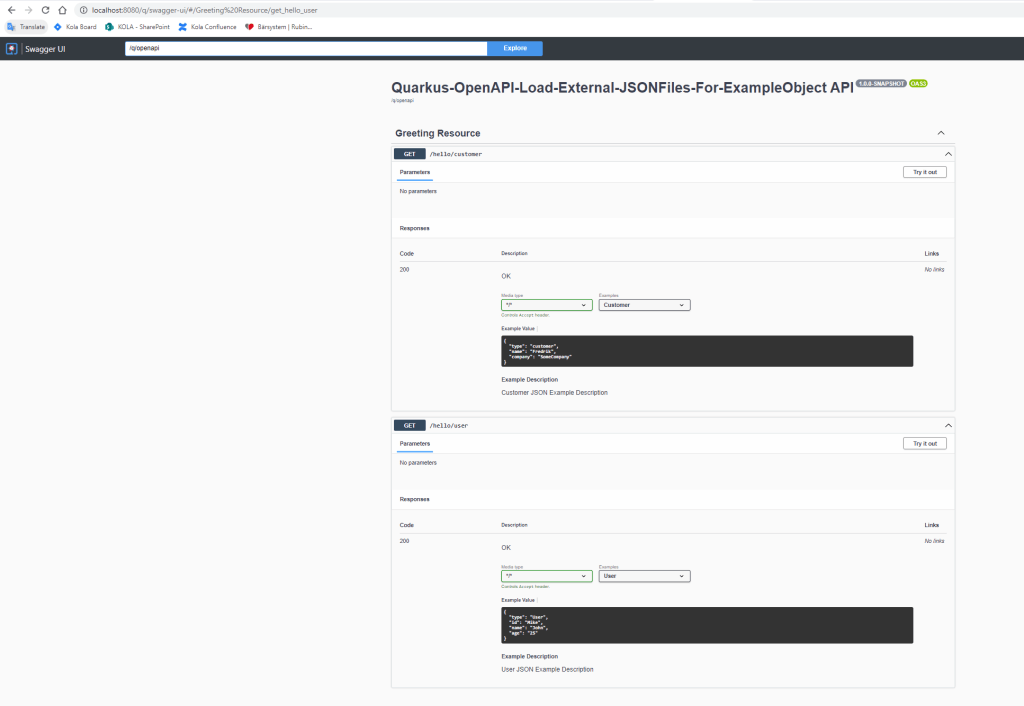
Then Swagger UI will showcase the proper JSON content for each response:
The code for this is located in github.
 JCompetence AB